Official Chrome Web Store Release
Install Topophony Music Discovery
Turn every music article, album review, and Wikipedia page into an interactive music discovery experience.
Add to Browser — Chrome Web Store
↗
See It in Action
Click any screenshot below to inspect it in full size:
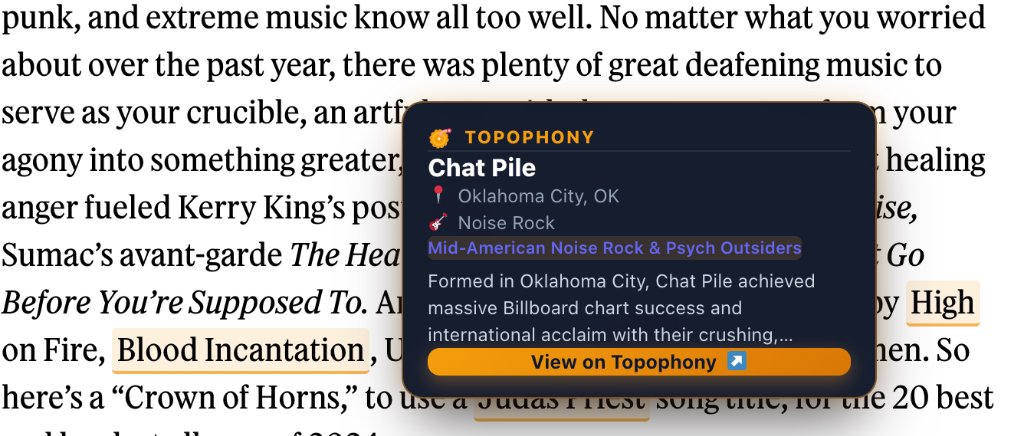
Spotlight Hover Cards
Hover over any highlighted artist in an article to view their origin hub, genre, movement, and bio.
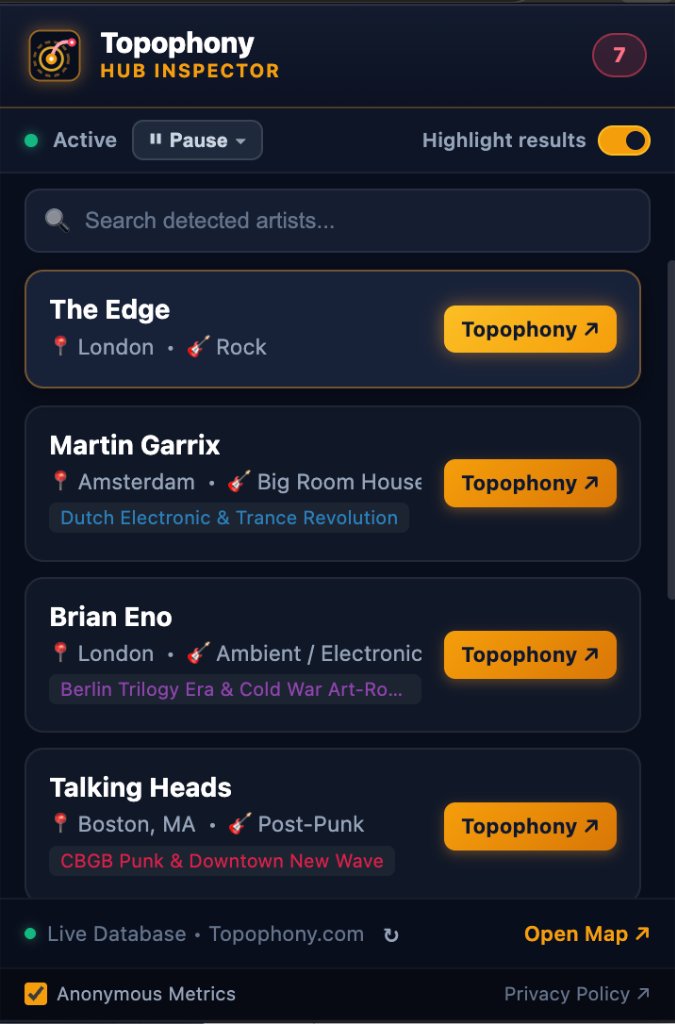
Hub Inspector Popup
See every detected artist on the page at a glance, search in real time, pause, or jump straight to the map.
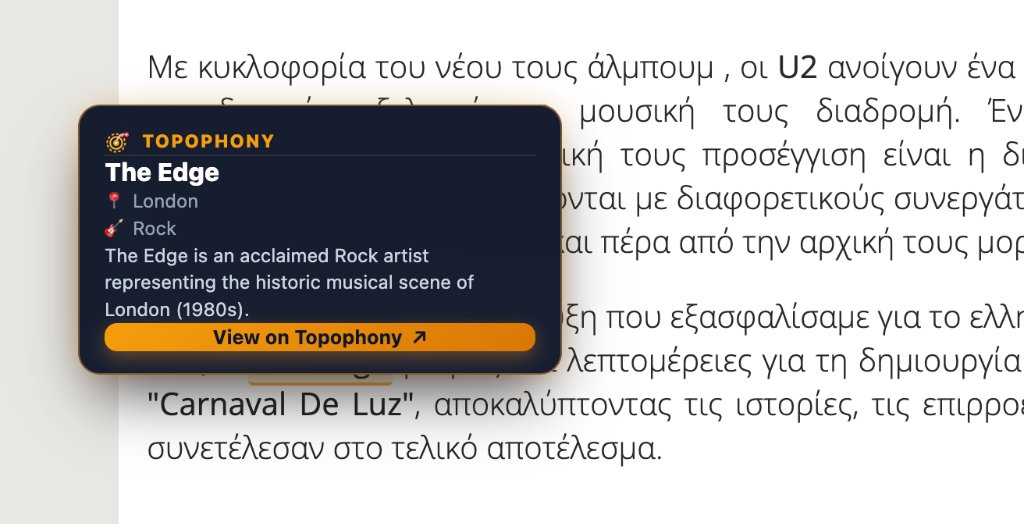
Works Across Websites
Detects international artists seamlessly across English, Greek, and global music press.
Compatible Browsers
Topophony is built on Manifest V3 and installs directly from the Chrome Web Store across all Chromium-based desktop browsers:
🌐
Google Chrome
Official Support
🧭
Microsoft Edge
Verified • Seamless
🦁
Brave Browser
Full Chromium Support
🔴
Opera
Full Chromium Support
🎨
Vivaldi
Full Chromium Support
⚡
Arc Browser
Full Chromium Support
1. Getting Started: How It Works
The Topophony Browser Extension is designed to accompany you as you read music articles, album reviews, Wikipedia biographies, and cultural news across the web.
As you read, recognized artist names are softly underlined. Hover your cursor over any underlined name to view an instant Spotlight Card containing:
- Origin Music Hub: The artist's verified birth city or regional scene.
- Primary Genre & Movement: The musical wave or movement that shaped their sound.
- Biographical Overview: A concise English bio detailing their historical impact.
- View on Topophony Button: Takes you directly to their interactive discography and migrations on the Topophony map.
Note: Existing links in articles are strictly preserved and never modified or replaced.
Click the Topophony icon in your browser's toolbar at any time to open the Hub Inspector:
- Counter Badge: The coral badge on the extension icon shows how many catalog artists were detected on the current webpage.
- Instant Search: Filter detected musicians in real time using the search bar.
- Scroll to Mention: Click on any artist card to instantly scroll the article directly to where their name is mentioned.
2. Controls & Settings Explained
You have complete control over your reading experience. All settings can be adjusted with one click in the Hub Inspector popup:
Need to temporarily disable highlights? Click the Pause ▾ button:
- Pause for 10 min, 30 min, or 1 hour: The extension will snooze and automatically wake up when the timer expires.
- Until turned on (Indefinite): Stays paused until you manually click "Resume".
If you want to read articles cleanly without any underlines, toggle "Highlight results" OFF. The extension will still count and list detected artists inside the toolbar Hub Inspector, but without touching the article text!
In the footer of the popup, you will find the "Anonymous Metrics" checkbox. Unchecking this box instantly stops all event telemetry to Google Analytics.
The extension automatically syncs its lightweight catalog with Topophony.com every 12 hours. You can also click the ↻ button in the footer to force an immediate catalog refresh.
3. Frequently Asked Questions (FAQ)
Does the extension track the websites I browse?
Absolutely not. All artist name matching runs 100% locally on your computer inside the browser sandbox. Webpage content, articles, and visited URLs are never saved or sent to any remote server.
Why doesn't the extension highlight anything on Topophony.com?
The extension automatically goes dormant when you visit the official Topophony.com web application, so it never conflicts with the interactive map or native interface.
How can I report an error or suggest a missing artist?
We warmly welcome community feedback! If you notice an inaccurate birthplace city, genre, or missing legend, please email us directly at info [at] topophony [dot] com.
4. Need Assistance or Have Feedback?
We are dedicated to building the best possible musical discovery companion. If you experience any issues or have questions:
Topophony Project Team
Email: info [at] topophony [dot] com
Website: https://topophony.com
Επίσημη Έκδοση στο Chrome Web Store
Εγκαταστήστε το Topophony Extension
Μετατρέψτε κάθε μουσικό άρθρο, δισκοκριτική και σελίδα Wikipedia σε μια διαδραστική εμπειρία μουσικής ανακάλυψης.
Προσθήκη στον Browser — Chrome Web Store
↗
Δείτε το στην Πράξη (Gallery)
Κάντε κλικ σε οποιαδήποτε εικόνα παρακάτω για μεγέθυνση:
Spotlight Hover Cards
Περάστε τον κέρσορα πάνω από κάθε υπογραμμισμένο καλλιτέχνη για να δείτε πόλη καταγωγής, είδος, κίνημα και βιογραφικό.
Hub Inspector Popup
Δείτε συγκεντρωμένους όλους τους καλλιτέχνες της σελίδας, αναζητήστε άμεσα, κάντε παύση ή ανοίξτε τον χάρτη.
Λειτουργεί σε Κάθε Ιστοσελίδα
Εντοπίζει διεθνείς καλλιτέχνες απρόσκοπτα τόσο σε αγγλόφωνα όσο και σε ελληνικά μουσικά άρθρα.
Συμβατοί Browsers
Το Topophony είναι χτισμένο σε Manifest V3 και εγκαθίσταται απευθείας από το Chrome Web Store σε όλους τους Chromium-based desktop browsers:
🌐
Google Chrome
Επίσημη Υποστήριξη
🧭
Microsoft Edge
Επιβεβαιωμένο • Απρόσκοπτα
🦁
Brave Browser
Πλήρης Υποστήριξη Chromium
🔴
Opera
Πλήρης Υποστήριξη Chromium
🎨
Vivaldi
Πλήρης Υποστήριξη Chromium
⚡
Arc Browser
Πλήρης Υποστήριξη Chromium
1. Πώς Λειτουργεί: Ξεκινώντας
Το Topophony Browser Extension σχεδιάστηκε για να σας συνοδεύει καθώς διαβάζετε μουσικά άρθρα, δισκοκριτικές, άρθρα στη Wikipedia και πολιτιστικά νέα στο διαδίκτυο.
Καθώς διαβάζετε, τα ονόματα των αναγνωρισμένων καλλιτεχνών υπογραμμίζονται διακριτικά. Τοποθετώντας τον κέρσορα πάνω σε οποιοδήποτε υπογραμμισμένο όνομα, εμφανίζεται άμεσα μια κάρτα Spotlight:
- Μουσικό Hub / Πόλη Καταγωγής: Η πιστοποιημένη πόλη γέννησης ή η τοπική σκηνή του δημιουργού.
- Κύριο Είδος & Κίνημα: Το ιστορικό μουσικό ρεύμα που διαμόρφωσε τον ήχο του.
- Συνοπτικό Βιογραφικό: Σύντομη επισκόπηση της ιστορικής του πορείας και επίδρασης.
- Κουμπί «View on Topophony»: Σας μεταφέρει απευθείας στη διαδραστική δισκογραφία και τα μεταναστευτικά τόξα του καλλιτέχνη στον χάρτη του Topophony.
Σημείωση: Οι ήδη υπάρχοντες σύνδεσμοι μέσα στο άρθρο δεν επηρεάζονται και δεν τροποποιούνται ποτέ.
Κάνοντας κλικ στο εικονίδιο του Topophony στη γραμμή εργαλείων του browser, ανοίγει το Hub Inspector:
- Ένδειξη Πλήθους (Badge): Ο κοραλί αριθμός στο εικονίδιο δείχνει πόσοι καλλιτέχνες του καταλόγου εντοπίστηκαν στην τρέχουσα ιστοσελίδα.
- Άμεση Αναζήτηση: Φιλτράρετε τους εντοπισμένους μουσικούς σε πραγματικό χρόνο μέσω της γραμμής αναζήτησης.
- Μετάβαση στο Κείμενο (Scroll to Mention): Κάνοντας κλικ σε οποιονδήποτε καλλιτέχνη, η σελίδα κυλάει ομαλά ακριβώς στο σημείο όπου αναφέρεται το όνομά του.
2. Ρυθμίσεις & Επιλογές
Έχετε τον απόλυτο έλεγχο της εμπειρίας ανάγνωσης. Όλες οι ρυθμίσεις προσαρμόζονται με 1 κλικ μέσα από το Hub Inspector:
Θέλετε να απενεργοποιήσετε προσωρινά τις υπογραμμίσεις; Κάντε κλικ στο κουμπί Pause ▾:
- Παύση για 10 λεπτά, 30 λεπτά ή 1 ώρα: Το extension αδρανοποιείται και ενεργοποιείται αυτόματα όταν λήξει ο χρόνος.
- Μέχρι να ενεργοποιηθεί χειροκίνητα (Indefinite): Παραμένει σε παύση μέχρι να πατήσετε «Resume».
Αν προτιμάτε καθαρή ανάγνωση χωρίς υπογραμμίσεις, απενεργοποιήστε το διακόπτη «Highlight results». Το extension θα συνεχίσει να καταμετρά και να εμφανίζει τους καλλιτέχνες στο Hub Inspector, χωρίς να αγγίζει το κείμενο του άρθρου!
Στο υποσέλιδο του παραθύρου θα βρείτε την επιλογή «Anonymous Metrics». Αποεπιλέγοντάς την, σταματά άμεσα κάθε αποστολή ανώνυμων μετρήσεων στο Google Analytics.
Το extension συγχρονίζει αυτόματα το ευρετήριό του με το Topophony.com κάθε 12 ώρες. Μπορείτε επίσης να πατήσετε το κουμπί ↻ στο κάτω μέρος για άμεση ανανέωση.
3. Συχνές Ερωτήσεις (FAQ)
Καταγράφει το extension τις σελίδες που επισκέπτομαι;
Σε καμία απολύτως περίπτωση. Η ταυτοποίηση των καλλιτεχνών εκτελείται 100% τοπικά στον υπολογιστή σας μέσα στο sandbox του browser. Το περιεχόμενο των σελίδων, τα άρθρα και οι διευθύνσεις URL δεν αποθηκεύονται και δεν αποστέλλονται ποτέ σε κανέναν εξωτερικό server.
Γιατί το extension δεν υπογραμμίζει τίποτα μέσα στο Topophony.com;
Το extension απενεργοποιείται αυτόματα όταν βρίσκεστε στον επίσημο ιστότοπο Topophony.com, ώστε να μην παρεμβάλλεται στον διαδραστικό χάρτη και στις εγγενείς λειτουργίες του site.
Πώς μπορώ να αναφέρω κάποιο λάθος ή να προτείνω έναν καλλιτέχνη;
Κάθε παρατήρηση είναι ευπρόσδεκτη! Αν εντοπίσετε κάποιο λάθος σε πόλη καταγωγής, είδος ή αν λείπει κάποιος θρυλικός δημιουργός, στείλτε μας email στο info [at] topophony [dot] com.
4. Χρειάζεστε Βοήθεια ή Έχετε Προτάσεις;
Είμαστε αφοσιωμένοι στη δημιουργία της καλύτερης δυνατής εμπειρίας μουσικής ανακάλυψης. Αν αντιμετωπίζετε οποιοδήποτε ζήτημα:
Ομάδα Topophony
Email: info [at] topophony [dot] com
Ιστότοπος: https://topophony.com